Custom Search
Showing posts with label Mozilla Add-ons. Show all posts

Adblock Plus 1.3.2 - Bothered by ads, banners, spy on your surfing?

Install Adblock Plus to regain control of the Internet and change the way we see the web.Adblock Plus allows you to regain control of the Internet and see the web as you want. This extension is supported by more than forty subscriptions in dozens of languages filters that automatically configured to remove power from online advertising to block all known malware domains.

License: Free
Language: English
Complement: Mozilla Firefox
Page Author: http://adblockplus.org

By henry
By henry

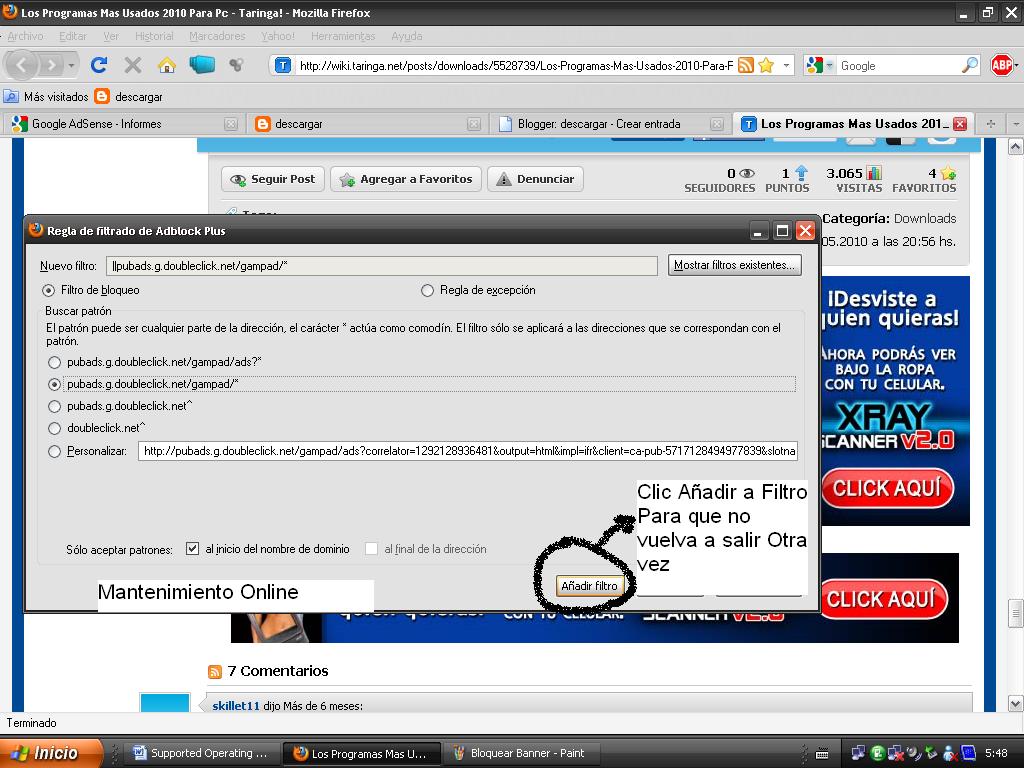
Adblock Plus also allows you to customize your filters with the help of various useful features such as contextual menu option for images, the locking of Flash and Java objects, and a list of blockable elements to remove scripts and style sheets.

Compatible Operating Systems:
Which are compatible with mozilla

Page Author: Adblock Plus

Note: to download this plugin you must have Mozilla Firefox installed, and download it from your browser. If not you can download the latest version here

Flagfox 4.0.11 - Mozilla Firefox Addons

Flagfox is an extension that displays the flag icon for the country where the server is physically located that is connected. Knowing where you are connected can be to make you more aware of its navigation and indicate the language and applicable local jurisdiction. More information can be obtained through numerous outpatient clinics, and users can add their own custom actions.

License: Free
Language: English
Complement: Mozilla Firefox


All these actions can be included in the contextual menu of the icon of the flag and assigned to mouse clicks or keyboard shortcuts for immediate access.

By clicking the flag icon is running the default action, Geotool, which provides a detailed map showing the city in which the server is located and other useful information such as local time and ISP. Many other actions are available with very different applications, such as:

* Security checks and malware sites
* Find similar sites and views about them
* Automatic translation into your language
* Information on SEO and web development
* Diagnostics as pings and traceroutes
* Whois and DNS information
* Validation code of a page
* Shrinking URLs
* Copy the IP address and other information from a server
* And you can also create your own custom actions

Flagfox is simple and discreet, and uses relatively few resources. To protect your privacy the consultations on the relevant country are made locally, instead of consulting a third party server each time you access a new page. It works by accessing an internal database of IP address location, a kind of simplified map of the geographical distribution of Internet, provided by Maxmind. This gives the country's flag which is actually located on the server you are connected, rather than the nationality of the domain name, which may be a different one. Flagfox is updated monthly to maintain the accuracy of its database.

Complement Compatible With:
Mozilla Firefox

Download link

Author Page: Flagfox 4.0.11 

Video DownloadHelper 4.8.1 - Download Youtube

Ever wanted to download your favorite youtube videos, but do not know how to bring down, So here is the solution to your problems Video DownloadHelper is a Firefox mozilla with which you can download any video from YouTube and any website contains videos. There are many programs that offer this service but all are complicated when it comes to copy the link, with this add only have to install automatically and an icon with three balloons near the video, you click and ready to start downloading without any problem.

License: Free
Complement: Mozilla Firefox

 By henry

As you all know this plugin only works with Mozilla Firefox browser. Just surf the web the way you normally do, when DownloadHelper detects it can do something, the icon gets animated and a menu allows you to download files by simply clicking an item.

For example, if you visit the YouTube page, you can download the videos directly on your computer. It also works with MySpace, Google videos, DailyMotion, pörkölt, iFilm, DreamHost and others.

Compatible Operating Systems:
All with Mozilla Firefox

Download Link:


Note: To install Video DownloadHelper, First you have installed Mozilla, and download it from the same Firefox. Download Mozilla Firefox Here

FoxTab 1.2.1 - 3D For Mozilla Firefox windows

FoxTab is a new and innovative way to organize your tabs in Firefox to see what is in them and you have open at a glance.

FoxTab is probably the most used by those who have too many tabs open. Eyelashes can be extended in five different ways depending on the view you prefer inevitably end up preferring one or the other for four of the points of view very quickly become redundant.

License: Free
Language: English

 By henry
By henry

The five designs to choose from are "Stack" - labels that are stacked in 3D form one after another, "Wall", which are the tabs are displayed on a wall (basically the desktop), Grid means that the tabs are aligned one of the network media row labels are arranged horizontally and, finally, Circle, where the fins are placed around a circle in 3D. To change views, just use CTRL TAB (or combination of keys of your choice) to go one by one. If you've ever used CoverFlow on the Mac, then FoxTab is based on the very principle

FoxTab is an innovative way to see how many tabs you have open and what is in them. However, they tend to get pretty loaded into RAM so make sure you have a lot otherwise, without complications

Compatible operating systems:
Win200, Win XP, Server 2003, Vista

Download Link:

Source: Softonic.com